The verdict up front
- Choose UptimeRobot if you want affordable, straightforward uptime monitoring with generous monitor counts and a free (personal) tier. It’s the better value for startups, developers and SMBs.
- Choose Pingdom if you need deep page-speed, transaction and real-user monitoring (RUM) with enterprise-grade reporting — and you’re willing to pay several times more for it.
In short: UptimeRobot is the value pick; Pingdom is the premium, performance-focused pick.
Side-by-side comparison
| UptimeRobot | Pingdom (SolarWinds) | |
|---|---|---|
| Free plan | ✅ 50 monitors (personal / non-commercial only) | ❌ Free trial only |
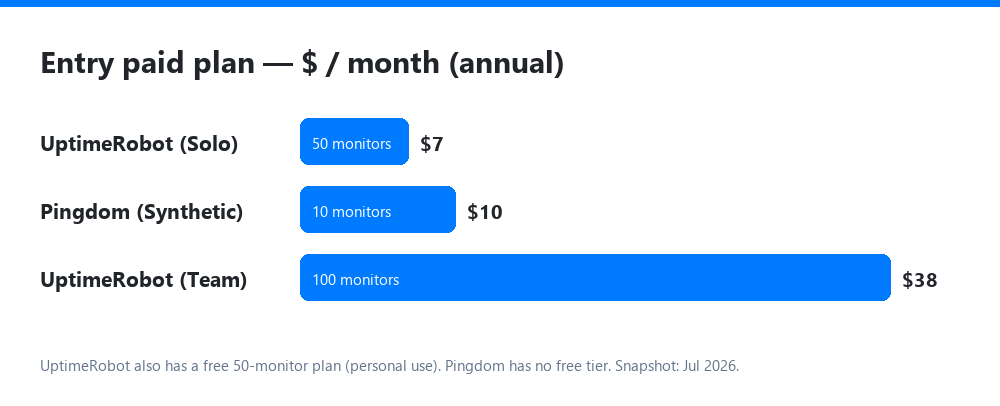
| Paid from | $7/mo (Solo, annual) | $10–15/mo (Synthetic Starter) |
| Fastest check interval | 60s (paid) / 30s (Enterprise) | 1 min |
| Monitor types | HTTP, ping, port, keyword, DNS, UDP, API | Uptime, transaction, page speed, API |
| Real User Monitoring (RUM) | ❌ | ✅ (separate product, from $10/mo) |
| Page-speed / transaction checks | Limited | ✅ Strong |
| Status pages | ✅ Included | ✅ Included |
| Best for | Value uptime monitoring, SMBs, developers | Enterprise performance + RUM |
Pricing is a July 2026 snapshot — verify on each vendor’s plan page. Annual billing saves ~20% on both.
Pricing compared
UptimeRobot keeps it simple and cheap:
- Free — 50 monitors, 5-min checks, 1 status page (personal, non-commercial use only since Oct 2024).
- Solo — ~$7–10/mo, 60-second checks, more monitor types.
- Team — ~$38–45/mo, 100 monitors, all integrations, full-featured status pages.
- Enterprise — from ~$69/mo, 200–1,000+ monitors, 30-second checks.
- SMS/voice alerts are paid add-ons (from ~$3 per 10 credits).
Pingdom splits into two paid products with no free plan:
- Synthetic Monitoring — from $10–15/mo (10 monitors), scaling to ~$249/mo (250+ monitors).
- Real User Monitoring — from ~$10/mo, sold separately.
- Watch for add-on/implementation costs; the median customer pays ~$296/year.
Bottom line on cost: UptimeRobot is materially cheaper for equivalent monitor counts, and it’s the only one with a usable free tier. Pingdom’s price buys performance depth (RUM + page speed), not more uptime checks.
Features & where each wins
UptimeRobot wins on:
- Price-to-monitor ratio (50 free monitors; 100 for ~$40/mo).
- Simplicity — set up uptime checks in minutes.
- A real free tier for personal projects.
Pingdom wins on:
- Real User Monitoring — actual visitor experience data, which UptimeRobot doesn’t offer.
- Page-speed and transaction monitoring — multi-step checkout/login flows and performance breakdowns.
- Enterprise reporting and a long track record.
A caveat on Pingdom: it’s a SolarWinds product and has shed some legacy/free features over the years, so confirm the current plan details and roadmap before committing.
Which should you choose?
- Startup / developer / SMB, cost-sensitive: UptimeRobot.
- You only need “is my site up?” alerts: UptimeRobot (or its free tier for a personal project).
- You need real-user performance data and transaction monitoring: Pingdom.
- Enterprise with budget and performance/RUM requirements: Pingdom.
- Want a middle ground? Consider Better Stack or Site24x7 — see our best uptime monitoring tools guide.